Yecaoyun is a veteran IDC provider under Hong Kong LucidaCloud Limited, established in 2012 and operating for 14 years. In the VPS community, few providers survive over a decade, making Yecaoyun a seasoned player.
Its main products include cloud servers (VPS), dedicated servers, and virtual hosts in Hong Kong and Los Angeles, USA. Since all data centers are outside mainland China, no ICP filing is required, and websites can go live immediately after domain resolution—this is the core appeal attracting many individual webmasters and foreign trade users.
Why Choose Yecaoyun
There are two main reasons: affordable and no filing required. Previously, I used Tencent Cloud's lightweight server; although cheap, the configuration was indeed underwhelming, and higher-spec servers were too expensive to afford. So I purchased a server for ¥114/month, and overall, the cost-performance is quite good.
My current blog runs on Yecaoyun, and overall, the access speed is quite fast.
Pricing
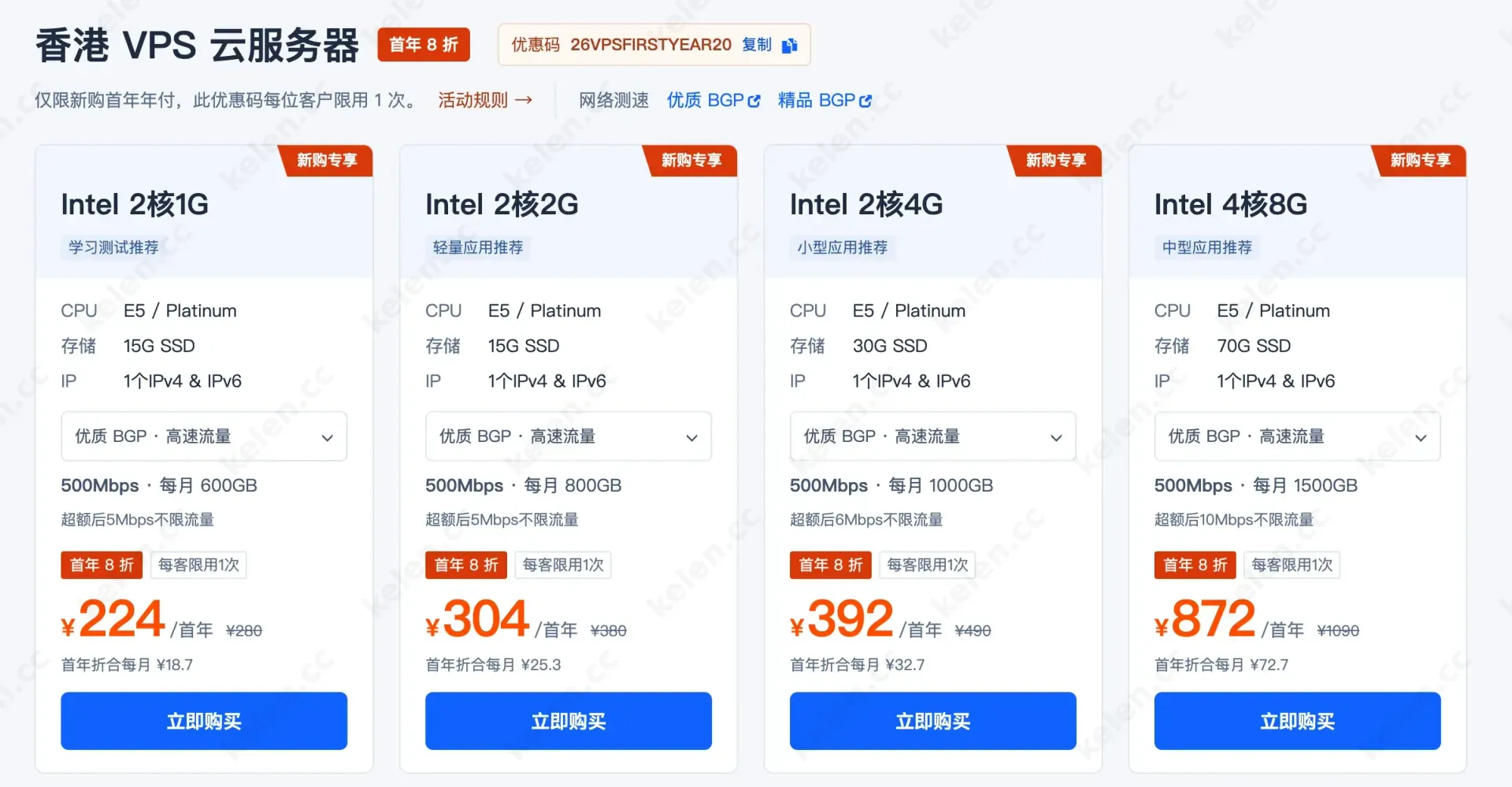
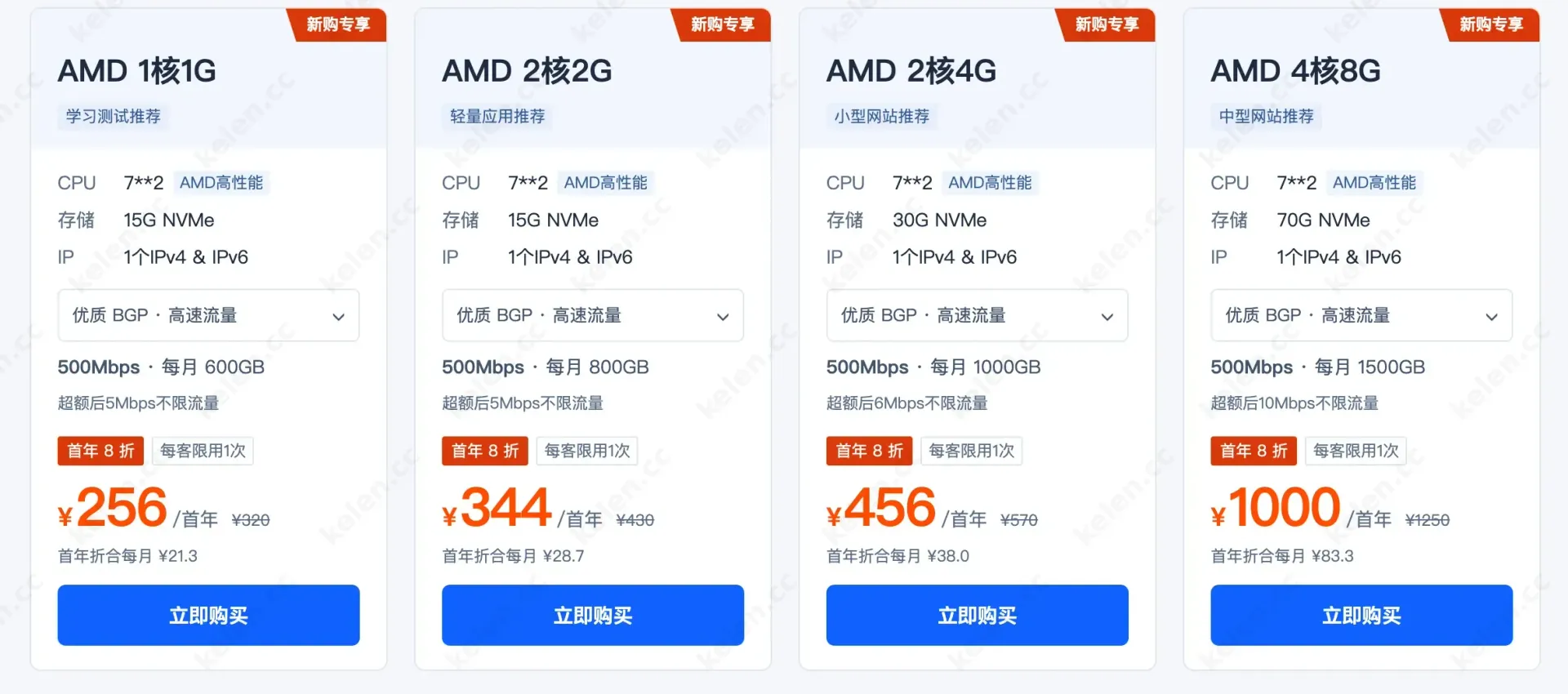
Yecaoyun's Hong Kong VPS starts at ¥118/year, and the US AMD Linux VPS starts at ¥26/month. This price point is quite competitive in the overseas VPS market, making it easier for budget-constrained students, individual webmasters, and independent developers. For other configurations, you can check the Yecaoyun VPS page.
Yecaoyun Promotions
The official frequently runs discount activities. If you need to purchase, keep an eye out; you can try buying a month to test. From my personal testing, the value is genuinely high:
- Latest promotions page: https://www.yecaoyun.com/Page/offers.html
- Hong Kong VPS Cloud Server: https://www.yecaoyun.com/Virtual/ssd_vps.html
- US VPS Cloud Server: https://www.yecaoyun.com/Virtual/us_los_angeles_vps.html
Yecaoyun VPS Selection Guide
Facing so many plans from Yecaoyun, many people are initially confused: What's the difference between Intel and AMD? How do 1G, 2G, and 4G RAM options differ? The 20% first-year discount looks appealing, but if you buy and find it insufficient, or you don't need such high specs, it's a waste.
Two Key Differences
Intel or AMD?
Under the same configuration, the AMD series comes standard with NVMe SSD, offering significantly faster disk read/write speeds than Intel's regular SSDs. For scenarios like hosting websites, running databases, and installing control panels that involve heavy small-file I/O, the smoothness NVMe brings is noticeable.
So the rule is simple: Choose AMD for the same configuration, unless an Intel plan has a particularly large discount that makes the price difference enough to ignore the performance gap.
RAM Matters More Than CPU
These plans use E5/Platinum or AMD 7**2 series CPUs. For daily learning, hosting websites, and running lightweight services, the perceived difference between 2 cores and 4 cores is far less noticeable than the jump from 1G to 2G or 2G to 4G RAM. When budget is limited, prioritize RAM over CPU cores.
Choose Configuration by Scenario
Scenario 1: Pure learning/testing, running scripts, temporary experimentation
Recommended: Intel 2-core 1G (¥224/first year) or AMD 1-core 1G (¥256/first year)
This tier is for trial and error. Installing Linux, practicing commands, running simple scripts, and setting up temporary test environments are more than sufficient. 1G RAM cannot run dynamic programs like WordPress, but it's ample for learning Linux and network fundamentals.
Choose Intel for the lowest budget, or spend ¥30 more for AMD with NVMe speeds.
Scenario 2: Personal blog, lightweight applications, small showcase sites
Recommended: AMD 2-core 2G (¥344/first year)
This is the most recommended starting tier. 2G RAM is the comfortable line for running dynamic blogs like WordPress and Typecho; NVMe storage makes backend operations and page responses more responsive. With 800GB monthly traffic and a 500Mbps port, personal sites won't come close to using it all.
The Intel 2-core 2G is ¥40 cheaper, but lacks NVMe. Unless the budget is extremely tight, it's better to go with AMD.
Scenario 3: Small applications, small databases, multiple small sites
Recommended: AMD 2-core 4G (¥456/first year)
Doubling RAM to 4G allows significantly more: small databases, Redis caches, and multiple low-traffic sites running simultaneously are less likely to crash from memory exhaustion. Storage also doubles to 30G, providing more room for files and databases of several sites.
If you want to avoid frequent upgrades later, this tier can be a one-time solution and last a year or two without issues.
Scenario 4: Medium-sized applications, production environments with performance requirements
Recommended: AMD 4-core 8G (¥1000/first year)
With 4 cores, 8G RAM, 70G NVMe, and 1500GB monthly traffic, this configuration can support medium-traffic sites or applications. But the price is higher—¥1000 for the first year. If you're only learning or testing, it's not advisable to jump to this tier unless you genuinely have corresponding business needs.
Service
Generally, you can submit tickets for any issues, and responses are quick during workdays, usually resolved within an hour or two. Overall, I'm quite satisfied with the processing speed.
How to Choose Bandwidth
Yecaoyun's Hong Kong VPS offers three network access options, which many people find confusing. Here's a brief explanation:
Premium BGP (Standard BGP): Telecom return traffic goes via CMI, Unicom via CU/NTT/CMI balanced, Mobile via Level3, and international directions optimized. Overall, it's balanced across the three major networks, and domestic access is generally fine—it's the top choice for moderate budgets.
Business BGP: Both Telecom and Unicom return via CU, Mobile via CMI. The return routes are cleaner, with less fluctuation during peak hours. If your business demands higher domestic access speeds, Business BGP is worth the extra cost over Premium BGP.
International BGP: Does not include CMI/CU; it's a purely international premium route, resulting in higher latency for domestic access. Suitable for independent sites targeting Southeast Asia, Europe, or the US, or purely overseas businesses; not recommended for scenarios where primary users are in mainland China.
You can choose the network plan based on your site's actual user base.
IP Cleanliness
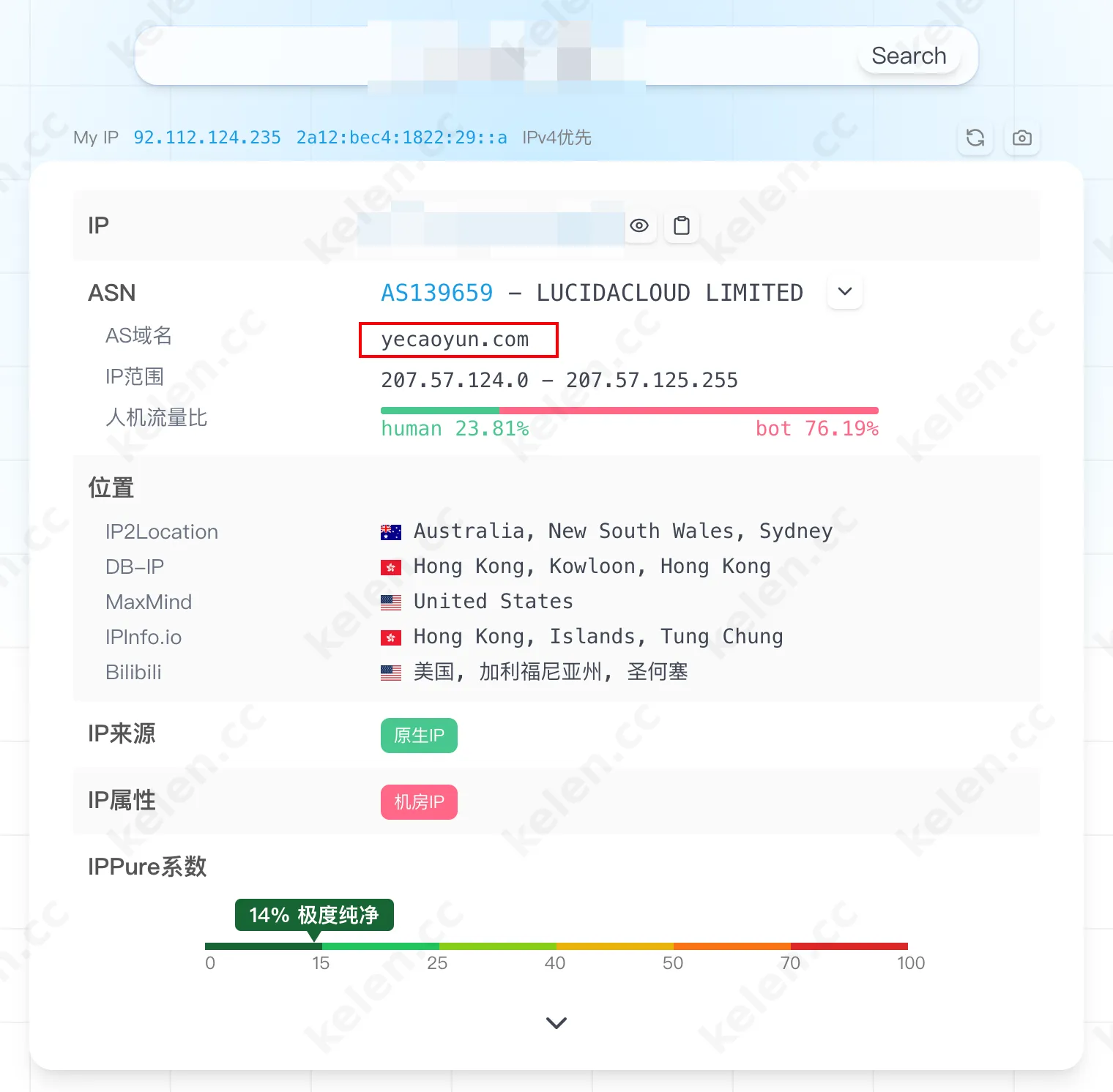
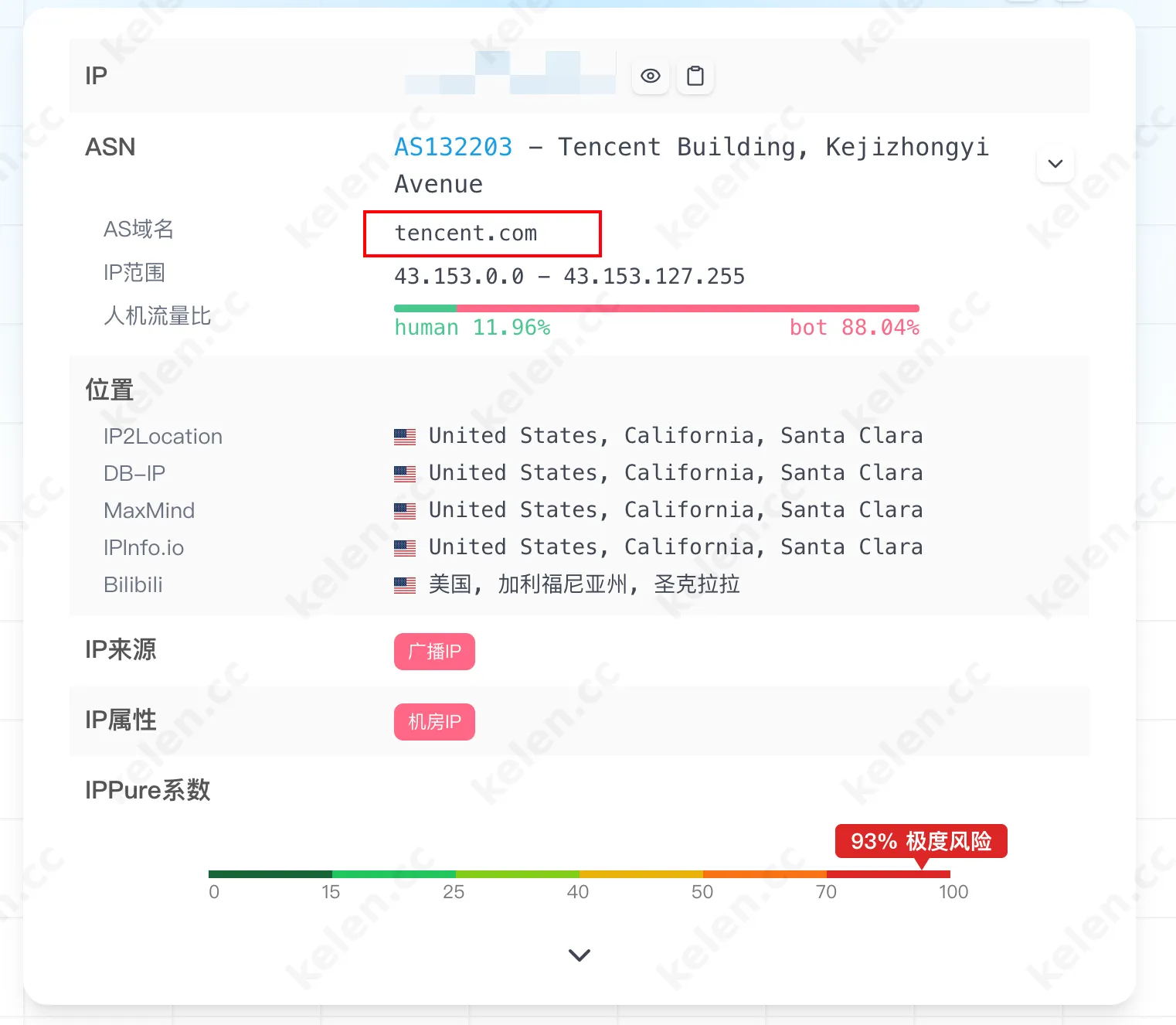
I compared the IP cleanliness of my previous Tencent Cloud server and the Yecaoyun server. Surprisingly, the IP quality of Tencent Cloud was inferior to Yecaoyun's, proving that Yecaoyun's server quality is relatively good.
Conclusion
Currently, Yecaoyun serves as my primary server. From the perspective of server configuration, price, and IP quality, I am overall satisfied. If you also have server hosting needs and want to avoid the hassle of ICP filing, Yecaoyun is a good choice with high cost-performance. I recommend it to you. If needed, you can click Yecaoyun VPS to purchase.