6 Best Free Clipboard Manager Apps for macOS
We copy and paste countless times a day on our Macs, but the built-in macOS clipboard only retains the most recent item you copied, overwriting everything else. Need to retrieve a text snippet, link, or image you copied earlier? This article rounds up 6 completely free macOS clipboard manager tools, with the last one being my personal favorite.
EcoPaste
EcoPaste is a cross-platform clipboard manager compatible with Windows, macOS, and Linux. It supports various formats including plain text, rich text, images, and files, with all data stored locally to ensure privacy. Built on Tauri, it's lightweight and compact, featuring offline OCR, smart grouping, favorites, built-in search, and data backup & migration capabilities to meet users' diverse management needs.

- Official Website: https://ecopaste.cn/
- GitHub Repository: https://github.com/EcoPasteHub/EcoPaste
Installation
You can easily install it via Homebrew:
brew install ecopasteOnce installed, the default shortcut is Option + C to instantly bring up your clipboard history. Smooth and seamless.
CopyQ
CopyQ is another cross-platform tool supporting Windows, macOS, and Linux. Its most powerful feature is script editing and automation commands, allowing you to automatically tag and categorize content based on its type. It comes packed with features like multi-tab management, item editing, and a screenshot tool, supporting various formats such as text, HTML, and images. Advanced operations can be performed via command line and scripts, making it ideal for developers or power users willing to invest time in customizing their tools.
- Official Website: https://hluk.github.io/CopyQ/
- GitHub Repository: https://github.com/hluk/CopyQ
Installation
It also supports Homebrew installation. Simply run the following command in your terminal:
brew install --cask copyqAfter installation, CopyQ appears as an icon in your menu bar, automatically recording all copied content and supporting quick pasting via keyboard shortcuts.
ClipCascade
ClipCascade's standout feature is real-time cross-device syncing—you can copy on one device and paste on another. It supports Windows, macOS, Linux, and Android, using end-to-end encryption (AES-256-GCM + PBKDF2) to protect your privacy. It offers both P2P (peer-to-peer) and P2S (server) sync modes, with real-time sync latency as low as 100ms. You can even self-host a server for data management, making it perfect for users who need seamless collaboration across multiple computers or phones.
While it's fully-featured, I personally don't have a strong need for multi-device clipboard syncing, so I haven't used it extensively. However, if you require syncing capabilities, this tool is definitely worth a try.
- Official Website: https://clipcascade.sathvik.dev/
- GitHub Repository: https://github.com/Sathvik-Rao/ClipCascade
Installation
ClipCascade requires manual installation. Follow these steps:
- Visit https://github.com/Sathvik-Rao/ClipCascade/releases/ and download the latest installation package for macOS
- Once downloaded, drag ClipCascade into your Applications folder
- Install the client on the devices you want to sync, configure the server address and encryption key, and you're good to go
Flycut
Flycut is a lightweight clipboard manager built on Jumpcut, designed specifically for developers. On macOS, the default shortcut is Shift+Command+V to bring up text clipboard history, while on iOS, simply opening the app lets you manage everything. It supports iCloud syncing. Focusing purely on plain text management, it saves up to 99 unformatted text entries by default, with minimal resource usage. It's free on the App Store—clean and distraction-free.
- App Store: https://apps.apple.com/app/flycut-clipboard-manager/id442160987
- GitHub Repository: https://github.com/TermiT/Flycut
Simply install it directly from the App Store.
Clipy
Beyond basic clipboard history management, Clipy's most notable feature is custom snippet support. You can register frequently used phrases, email templates, code blocks, and more as snippets for one-click pasting—perfect for users who frequently input repetitive content. It supports various formats including plain text, rich text, PDF, filenames, URLs, and TIFF images, with robust search and categorization features. The project is still maintained and requires macOS 10.10 Yosemite or later.
- Official Website: https://clipy-app.com/
- GitHub Repository: https://github.com/Clipy/Clipy
Installation
You can quickly install it via Homebrew:
brew install --cask clipyAlternatively, visit the GitHub Releases page at https://github.com/clipy/clipy/releases to download the latest .dmg installer.
Maccy
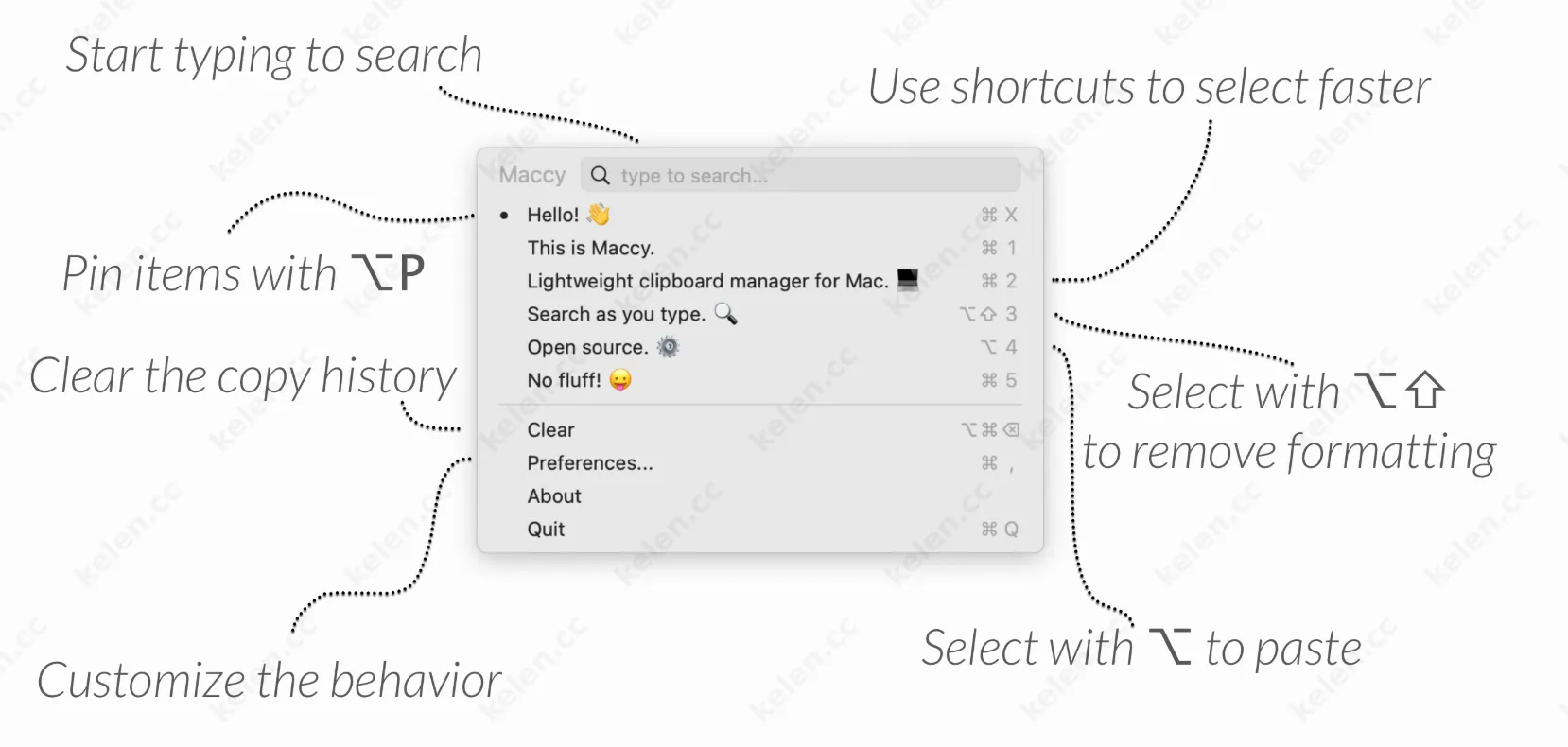
Maccy is a clipboard manager that prioritizes extreme lightweight performance and speed. At just 2.2MB, it runs as smoothly as a native app. It embraces a "keyboard-first" design philosophy, where all operations can be performed via shortcuts. It also takes your privacy seriously—all data is stored only on your local computer, and it won't log sensitive information from password managers. In 2024, it released version 2.0 (the biggest update in 7 years), with version 2.4.0 adding OCR image text search functionality.
- Official Website: https://maccy.app
- GitHub Repository: https://github.com/p0deje/Maccy
Installation
The simplest and fastest way is to run the following command in your terminal:
brew install maccyHomebrew will automatically download and install the latest version of Maccy. If you choose to install via the App Store, it costs $9.99. This is actually a great way to support the developer—there's no functional difference between the paid and free versions.
All 6 tools recommended above are completely free, without any "freemium" limitations during use, so you can rely on them long-term with confidence. Simply pick the one that best fits your workflow, and if you know of any better tools, feel free to share your recommendations in the comments.