Grok recently opened a low-price subscription channel in the India region, which is an excellent opportunity for users who want to experience SuperGrok services at a low cost. You can get up to 3 months of service benefits for approximately 49 yuan.
Risk Warning
Although this process is logically closed-loop, there is one variable to note: the retention discount popup is not 100% guaranteed. If you don't see the "3 months for the price of 1 month" discount popup when canceling your subscription, it is recommended to proceed with caution to avoid budget overruns.
If you really want to take the gamble, please strictly follow the step-by-step instructions below.
Environment Setup and Account Registration
First, we need to prepare a clean Indian region Apple ID. If you don't have one, you can register one yourself.
- During registration, be sure to select "India" as the region.
- The phone number can directly use a domestic +86 mobile number that can receive verification codes normally, no Indian local number is required.
- After registration, log out of your original App Store account on your iPhone and log in with this new Indian region ID.
- After successful login, search for "Grok" in the App Store and download the app.
Eligibility Check
This is the most critical step in the entire process, which directly determines whether you need to spend money.
Open the Grok app and select "Sign in with Apple". After entering the main interface, please carefully check if your account interface shows a "7-day free trial" entry or prompt.
If there isn't one, it means you don't have trial eligibility. Just close the page and there's no need to continue reading. `
Fund Preparation
After confirming trial eligibility, you can go to third-party trading platforms (such as Xianyu) and search for "Indian region Apple gift card". Purchase a gift card with a denomination of 700 rupees, which currently converts to approximately 49 yuan at market exchange rates.
After obtaining the redemption code, return to the App Store to top up.
Note: Please be sure to verify the regional attribute of the gift card. Gift cards from other regions cannot be topped up into an Indian region account.
Subscription and Strategic Cancellation
When your Apple ID balance shows 700 rupees, go back to the Grok app and click to activate the "7-day free trial". Since the account balance is sufficient, the system will directly charge and authorize without requiring you to bind an Indian bank card.
After successful activation, immediately perform the "cancel subscription" operation. This step is to trigger the retention mechanism.
- Find the SuperGrok management page in the left sidebar of Grok.
- Click "Manage Your Billing", then select "Downgrade" or cancel subscription.
Locking in the Discount
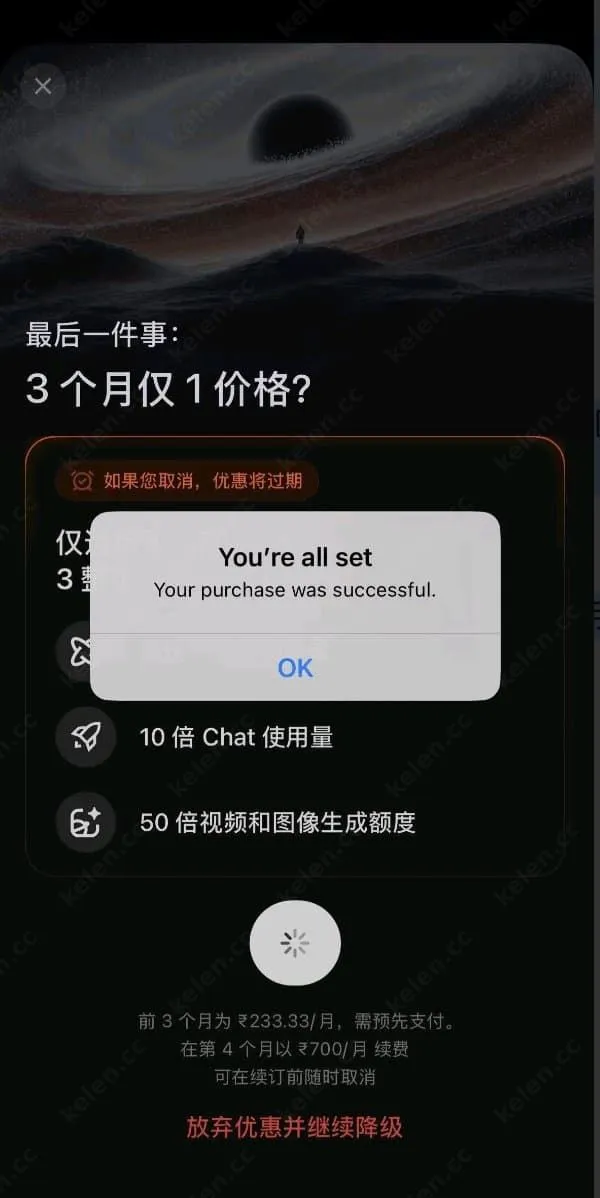
When you click to cancel the subscription, Apple's retention mechanism will usually be triggered. The system will pop up a retention discount window, prompting you that you can "subscribe to 3 months of SuperGrok for the price of 1 month".
Once you see this popup, simply accept it. This way, after the 7-day trial period ends, the system will deduct 700 rupees from your balance to activate a 3-month membership for you.
By following the steps above, you can experience the full features of Grok with an extremely low barrier to entry.